What’s new

Keep up with the latest releases, improvements and fixes.

Follow @NotionHQ

Notion 3.4, part 2

Custom Agents for every team.

We launched Custom Agents a few weeks ago, and teams are building faster than we can keep up with. In Notion 3.4, your agents can take on even more of your day-to-day busywork.

Custom Agents are now easier to fine-tune, and the new AI Autofill brings them straight into your databases, making enrichment and upkeep automatic. And you can create skills for your Notion Agent, so it can learn your most important workflows.

Custom Agents are still free to try until 3 May 2026, so now’s the time!

Teams and Custom Agents, working together

Teams and Custom Agents, working together

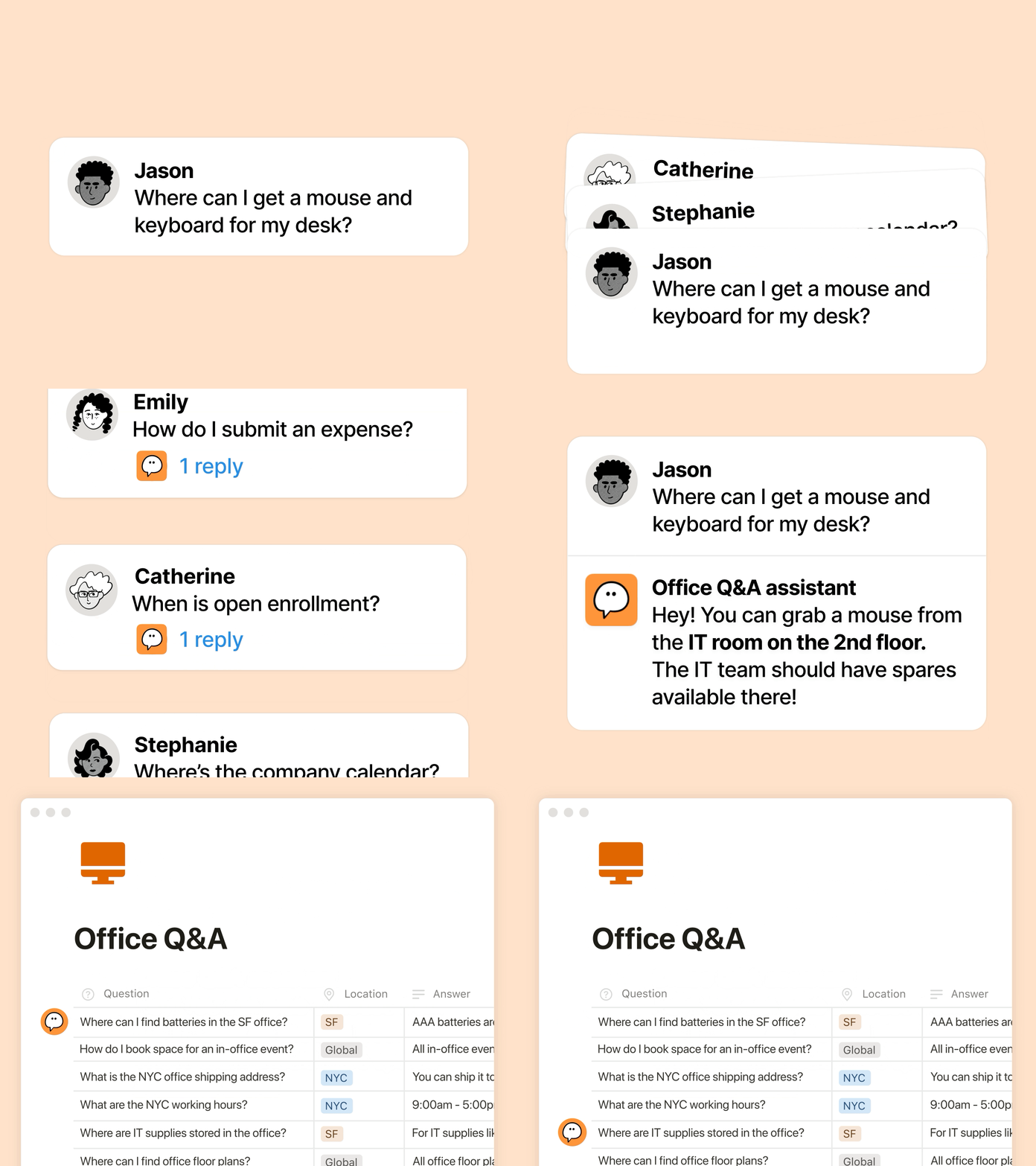
In case you missed it, here’s a quick refresher on Custom Agents: they’re like AI teammates that handle your repetitive work. Since they launched a month ago, we’ve seen all manner of teams discover new ways to put them to work:

  • Surface the right info at the right time: Ramp’s GTM team uses Enablement Eddie to pull up the right assets and customer answers.

  • Handle repeat questions: Clay runs an IT Buddy that resolves common employee questions in minutes.

  • Automate reporting: Braintrust’s Competitive Intelligence Agent tracks competitor updates across the web and Gong call transcripts, then revises internal docs every morning so the latest context is ready for the day.

New Custom Agent upgrades: efficiency, transparency, context

New Custom Agent upgrades: efficiency, transparency, context

You want agents to help, but you need pricing that scales, visibility into what agents are doing and integrations with your tool stack. This update hits all three:

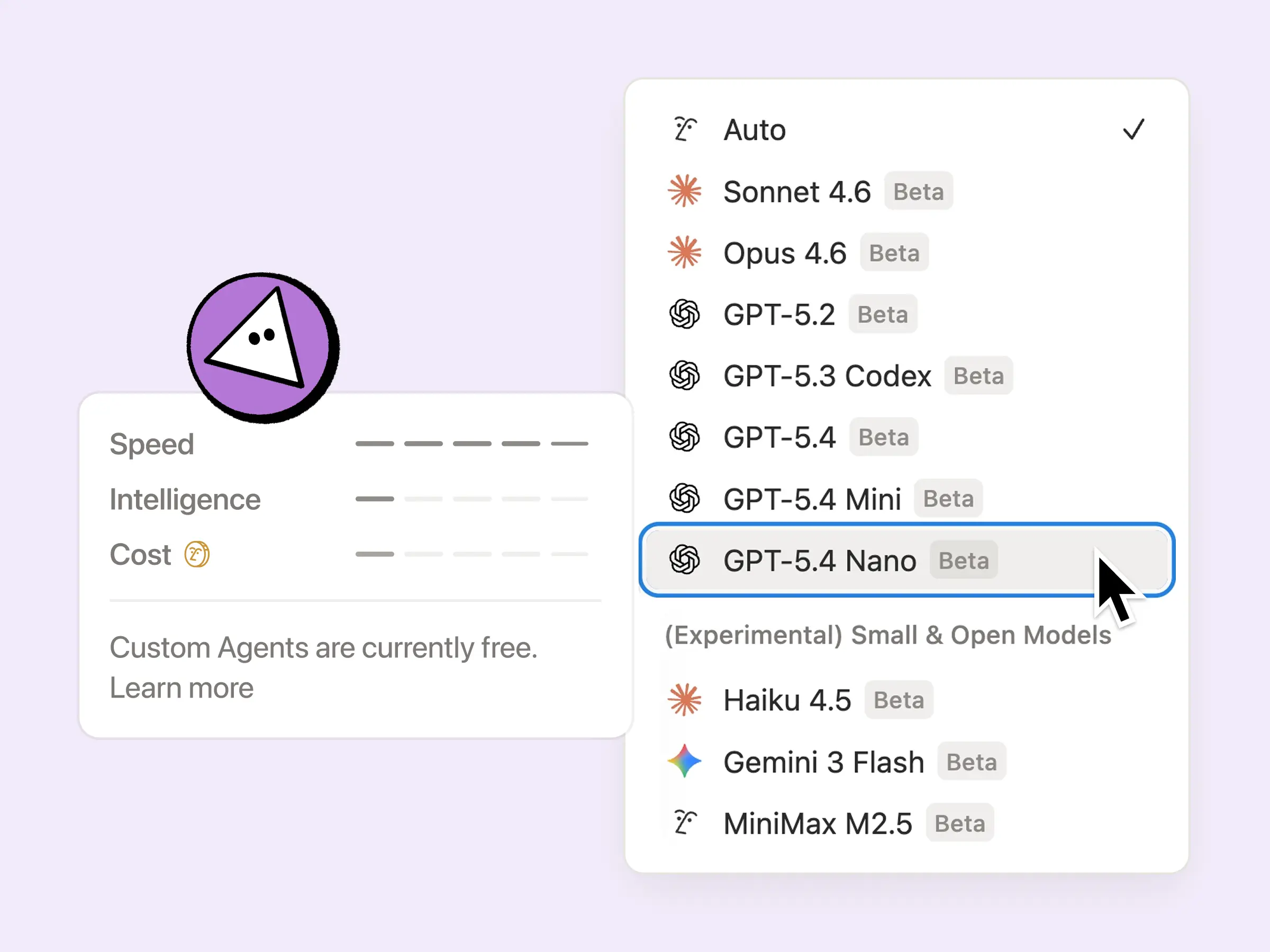
  • More efficient to run: Custom Agents are now 35–50% cheaper to run across the board, especially those with repetitive tasks like email triage. They’re even more cost-efficient when you choose new models such as GPT-5.4 Mini & Nano, Haiku 4.5 and MiniMax M2.5, which use up to 10× fewer credits.

  • Visibility into your Agents’ credits: it’s now easier to fine-tune your agent and understand what’s working, thanks to the Notion credits dashboard. We’ll continue to add more signals over time, making it easier to optimise and decide what’s worth running. Here are a few tips to fine-tune your agents.

  • More context to work with: Custom Agents can finally use private Slack channels, so they’re not missing the conversations that matter. Many more integrations to come, including Microsoft Teams, Google Drive, Salesforce and custom connectors.

From 4 May, Custom Agents will use Notion Credits that you can purchase. In the meantime, they’re free for a few more weeks, so now’s the time to try them out.

AI Autofill in databases, powered by Custom Agents

AI Autofill

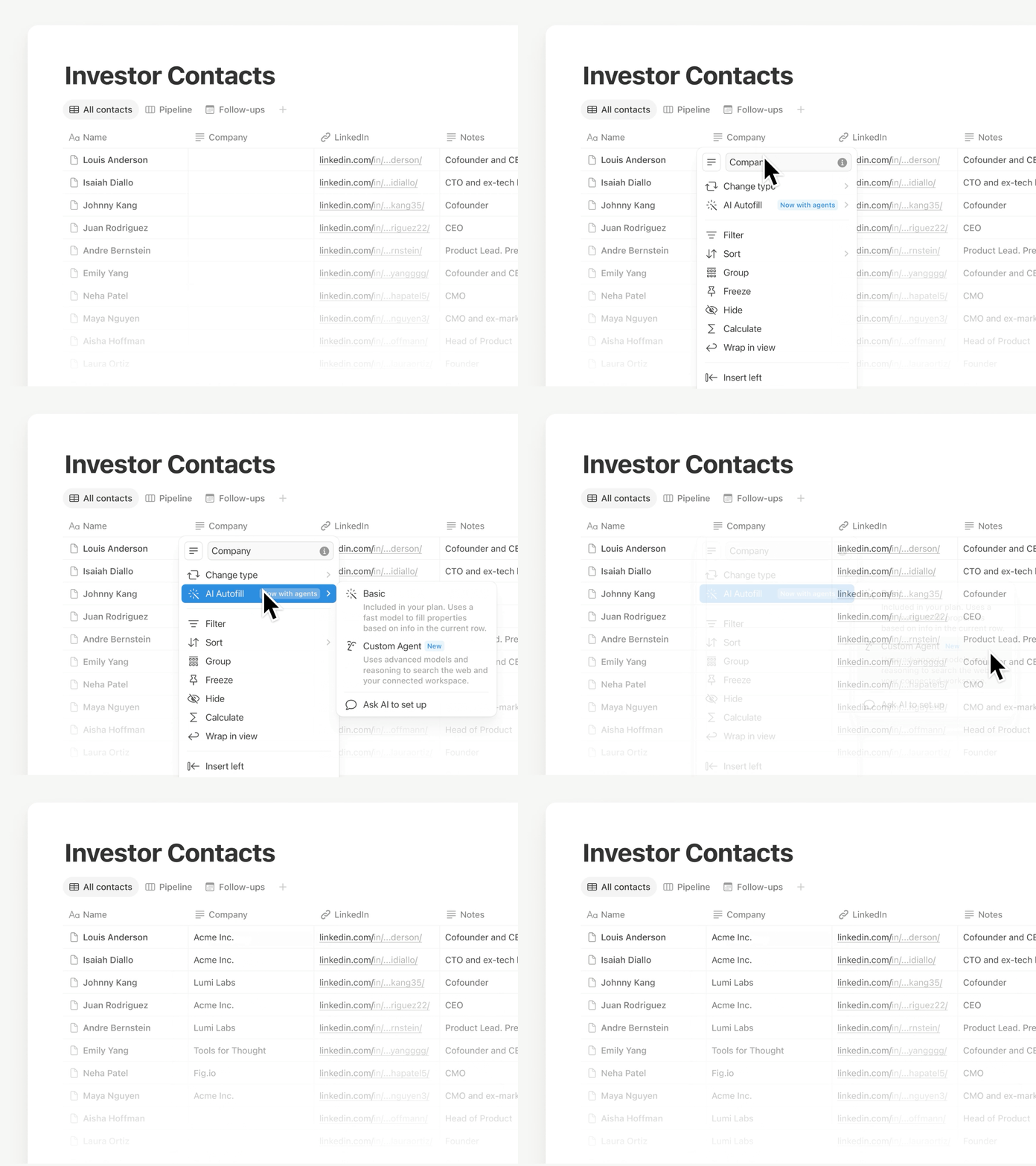
Use Autofill to keep your data fresh and up to date, now with all the power and intelligence of Custom Agents. Continuously enrich, extract and categorise information across every row, so your database stays trustworthy without manual review.

This feature is being rolled out now, so if you don’t see it yet, you will soon. For simpler fills, basic AI Autofill remains included in Business and Enterprise plans. Learn more →

Your Notion Agent has new Skills, integrations … and you can talk to it!

Your Notion Agent has new Skills, integrations

Skills turn ‘that thing you always ask Notion Agent to do’ into something it can do on command. Save your best workflows as skills, such as drafting weekly updates, reshaping a doc in your team’s format or preparing briefs before a meeting.

Your Notion Agent also has a few more tricks up its sleeve:

  • Integrate with Calendar, Mail and Slack: ask your agent to read, summarise and follow through in the tools you use every day.

  • Inline doc edits: have your agent edit directly in your doc when you select text, so changes happen in place.

  • Talk to your agent: use the microphone button to dictate your prompt.

Customise your AI Meeting Notes summary

Customize your AI Meeting Notes summary

Your no. 1 feature request for AI Meeting Notes is finally here! Now you can add a quick set of custom instructions, so summaries come out in the format you prefer. Also, summary quality has been getting even better, as AI now does the heavy lifting of pulling in relevant workspace context. Learn more →

New AI connectors: Salesforce and Box

New AI connectors: Salesforce and Box

With the Salesforce connector, search accounts, opportunities and notes to prepare for calls, draft follow-ups and build account plans without bouncing between tabs. With the Box connector, search and summarise files such as proposals, contracts and project documents to extract key details, compare versions and keep deliverables moving.

A meaningful performance boost

A meaningful performance boost

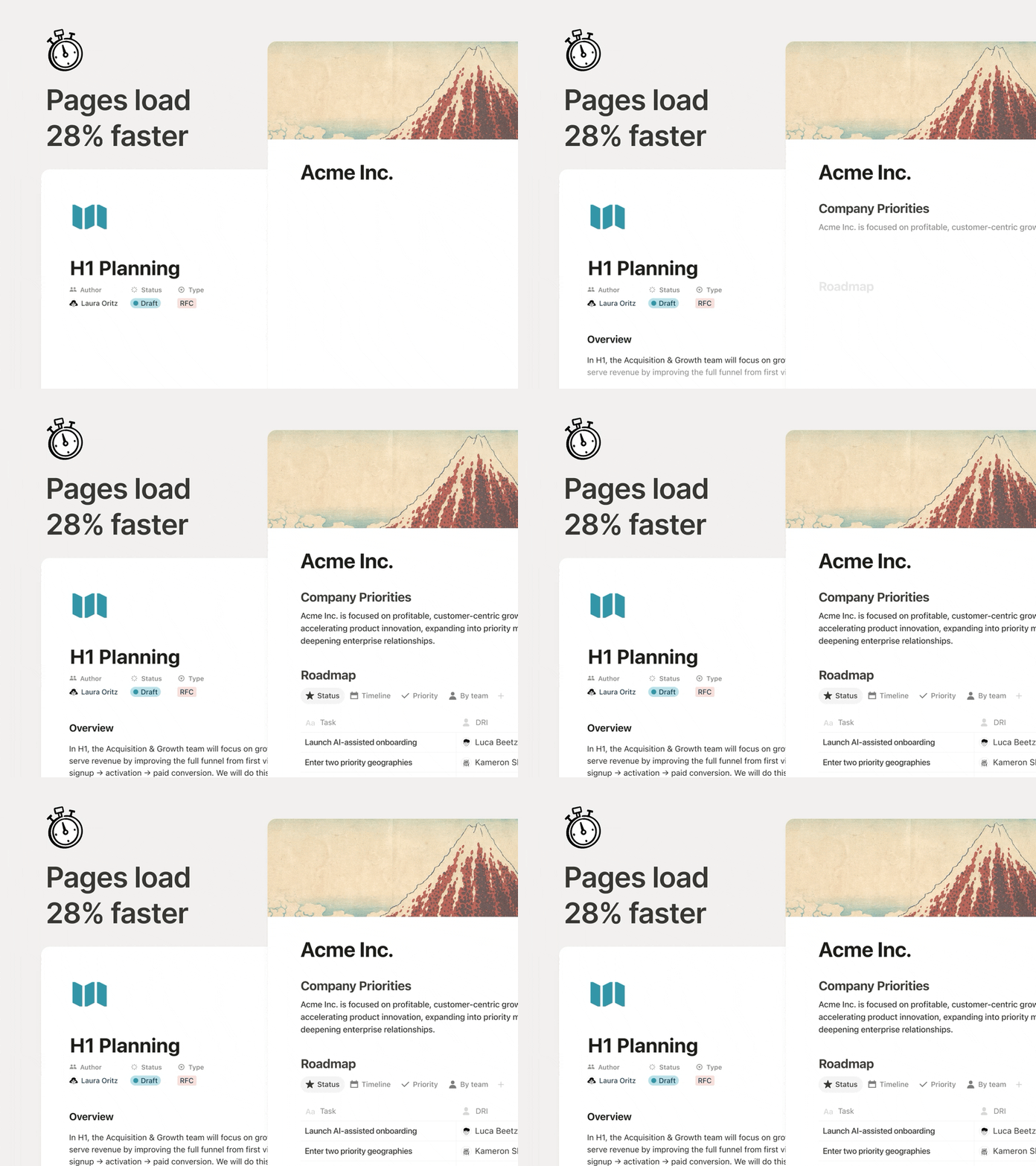
Pages should feel instant, especially when you’re switching between docs all day. Now, initial page rendering is 28% faster, so content appears sooner and you can stay in the flow. It’s a small change, but it adds up quickly.

New database permission: ‘Can create pages’

New database permission: “Can create pages”

Allow teammates to create new pages in a database, while still being restricted from viewing or editing other content they shouldn’t have access to.

Imagine a meetings database where a teammate should be able to access their own meeting notes and create new meetings, without being able to view anyone else’s. Try it in cases where your team is working with external contributors or sensitive information.

But wait, there’s more

  • AI Meeting Notes supported via API: integrations can now pull full transcripts and summarised notes, so teams can automatically follow up on action items across the tools they already use.

  • n8n MCP integration: connect your Custom Agents to n8n so they can run the automations you already use and help coordinate work across your other apps and APIs.

  • MCP improvements: AI tools can now do more in Notion, reliably, across comments, meeting transcripts and Notion Sites, with faster responses and new admin controls such as auditing and approved tools.

We’ll keep making Notion AI a better tool for (human) teamwork.

Cheers,

Ivan

P.S. I worked with our creative team on a video that explains our feelings on AI. You can watch it here.

Customise your tabs in databases

Keep your databases clean and easy to navigate by choosing how your tabs are displayed: Text and icon, Icon only or Text only. This setting is only for you, which means that others won’t see any change.

New page cover art from timeless collections

Choose page cover art from four new collections, sourced from museums and public archives.

These include natural textures from Texturelabs, Hudson River School paintings from The Metropolitan Museum of Art, Chinese silk paintings from the National Museum of Asian Art and watercolour fruits from the USDA Pomological Watercolours collection.

Mute discussion replies

Mute discussion replies

Keep your notifications clean by muting replies to discussions you no longer find relevant. If someone @-mentions you or you post a new comment, notifications resume automatically. You can also manually unmute at any time via the ••• menu.

See the announcement on X →

Share Notion AI chats as a link

You can now share your Notion AI chats as a read-only link. Share a helpful response, your latest prompting technique, or any conversation you’d like a teammate (or the world) to see.

Manage all your shared links in SettingsPublic pagesShared AI chats.

See the announcement on X →

Voice input on desktop

Voice input for Notion AI is now available on desktop. Whether you are dictating a longer prompt, or just prefer talking over typing, voice input makes it easier to get things done with your Agent.

Keep pages tidy with tabs

Tabs let you split a page into clean sections so you can keep related content together without a long vertical scroll. Type /tabs to get started.

See the announcement on X →

Archive outdated pages to keep your workspace fresh

Archive outdated pages to keep your workspace fresh

Archive lets you mark pages as outdated to keep your workspace tidy and improve your search results.

Archived pages have a banner showing who archived them and when, and they are hidden from search, the sidebar and database views by default. Archive a parent page and its sub-pages follow automatically.

To archive, click ••• in the top-right of any page and select Archive.

Learn more from our Help Centre

3.4

Notion 3.4, part 1

This month, we have a champagne problem: our engineers are shipping faster than ever, which means Notion 3.4 has too much to cover in a single email.

So let’s start with the fundamentals, like a new dashboard view for your databases, a completely redesigned sidebar (opt-in to try it out!), presentation mode that turns any doc into a slideshow, and a lot more.

Dashboards give you a bird’s-eye view

Dashboards

Bring together charts, KPIs, and metrics into one beautiful dashboard, so you can see what’s up and what’s changed. Much easier to create and maintain versus a workaround like a page of linked views.

To get started, try describing the dashboard you want to your Notion Agent. It can build and update for you! Available on Business & Enterprise plans. Learn more →

A new sidebar, built for focus

Sidebar

The sidebar was getting far too crowded. So we organized it into four new tabs, with easy access to your pages, agent chats, meetings, and notifications. And it’s way more customizable: you decide which sections to toggle on and off.

If you want a quick tour, take a look at Jon's walkthrough. Be among the first to try it by opting in, and let us know what you think!

Finally, a proper presentation mode!

Finally, a proper presentation mode!

Presentation mode started in a very Notion way: Randy and Cole on our design team woke up one day and decided, “presenting a Notion page should be easy… and fun.” So they built it. Now, you can present directly from a page without having to rebuild your work. Try it with the shortcut ⌘ + opt + p on Mac, or Ctrl + alt + p on Windows.

It’s currently in beta for everyone on Plus, Business, and Enterprise. Check out Randy’s demo.

Here at last: the fabled “tabs” block

Here at last: the fabled “tabs” block

Notion HQ had an internal “tabs” block for years, but the secret finally got out. Time to set it free. Now you can organize content into clean, clickable sections, without the maze of subpages. Check it out.

Generate images, charts, slides, diagrams

Generate images, charts, slides, diagrams

Generate images right where your work lives, so visuals stay connected to the plan, the brief, and the decisions behind them. It’s the Notion way: iterate in context, remix what’s on the page, and turn text into everything from process diagrams to onboarding visuals in seconds. Just ask your agent. Here’s how you can get started.

Archive pages for better search & AI results

Keep your workspace clean as it grows: now you can mark old pages as archived instead of deleting them, so they stay accessible without cluttering search and navigation. Archived pages are hidden from search by default, so they’re a great tool to improve your team’s AI responses.

We shipped just a few other things too

  • H4 headers: Smaller than H3, bigger than text.

  • Markdown Content API: Markdown tools can now read and write Notion directly, which makes integrations simpler and more reliable.

  • SDK improvements: Integrations are now easier to build and more reliable, with automatic retries, Markdown and Meeting Notes support, and clearer setup warnings, so workflows break less often and ship faster.

Tell us what’s working (and what you want next). We’re building fast.

Cheers,

Ivan

P.S. Notion 3.4 also includes an exciting list of upgrades for Notion AI that are already rolling out now. I’ll send a note about that soon. In the meantime, you can watch this video.

P.P.S. If you’ve been curious about Custom Agents, now’s a good time to try them for free through May 3, 2026. Get started here.

Custom skills for Notion AI

Custom skills let you turn any repetitive AI task into an easily accessible command. Use custom skills from the text selection menu or @mention them directly in an agent chat. Because skills are pages, your whole team can use and build on the same ones.

To designate a page as a skill, open the ··· menu and choose Use with AIUse as AI skill. Manage everything from SettingsNotion AIGeneral.

Available on Business and Enterprise plans.

Find the announcement on X →

Powered by Fruition